
Inspect the sources returned with AI answers
See the pages, review sites, and discussions returned with your monitored answers. PromptScout groups sources by domain, provider, and page type so you can inspect recurring patterns. Included from Starter.
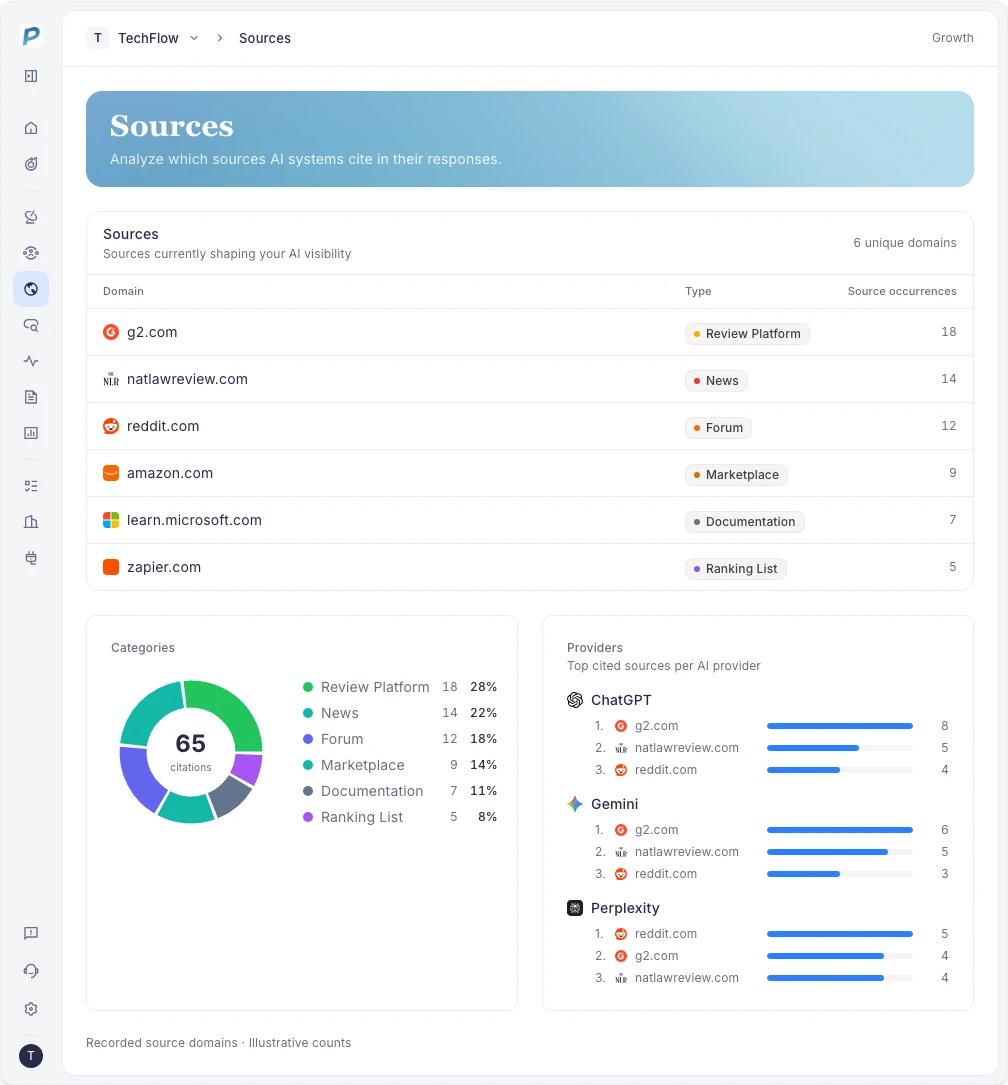
Open the evidence behind a source count
Review source URLs and the answers they came from. Sources can include displayed citations and URLs returned in a provider's source list. A returned URL alone does not show whether the provider displayed a citation or used the page to write its answer.
- Inspect recurring domains and individual URLs
- Compare sources across providers
- Read brand quotes with their answer context
Find the page types worth reviewing
Source categories distinguish reviews, documentation, comparison pages, and community discussions. Check which types recur on questions where competitors appear. Use the actual pages to decide whether your next action belongs on your website or another channel.
- Compare source categories on relevant questions
- Inspect Reddit threads and community context when available
- Review your owned pages against the claims buyers ask about
From analysis to a content brief
Starter includes source analysis. Growth and higher add Opportunities and Content Briefs. When a content or comparison Opportunity has enough evidence, use its prompts, competitors, and source URLs to guide a page update.
Related Features
AI Brand Monitoring
Track brand mentions in AI answers with PromptScout. Review answer context, competitors, and provider results over time. Included from the Starter plan.
Explore AI Brand MonitoringCompetitor Tracking
Compare competitors in monitored AI answers. Track mentions, rankings, share of voice, and the language used to describe each brand. Included from Starter.
Explore Competitor TrackingBrand Positioning Analysis
Review the attributes and phrases AI uses to describe brands. Compare positioning evidence, provider context, and competitor language in PromptScout.
Explore Brand Positioning Analysis